Artificial Intelligence is a term that has suffered from a lot of inflation the past years, with too many companies gladly and freely using the term for marketing to describe their (most definately not "AI") products. That probably has put many off.
This must be very frustrating for researchers in cognitive engineering and neuroscience because really massive steps forward are being made in understanding how the brain works thanks to their hard work.
Understanding how consciousness is formed is of course not the same as simulating it on a computer.
Still, thanks to this understanding expect many steps forward with adaptive / learning / evolving algorithms. These will find their way in the near future into robots, neural prosthetics, UAV's, image recognition, automonous vehicles, your washing machine and much more.
Look on the site of DARPA (always a good indicator) and you'll see the importance the US Army is placing on "intelligent" technologies.
So yes it is the future. But more in terms of a strategic direction than actual products.
Monday, May 19, 2008

Saturday, May 17, 2008
Choosing a Content Management System
* How do you want to use it? Many people get hung-up on features lists, pitting various CMSes against one another in a matrix of checks and X's, but this is almost always misleading. You don't seem to be heading down that particular rabbit's hole when you say you want to "edit/change/add/remove pages," but it can become tempting. Writing down some quick use case scenarios can be a good way to stay on track. For a basic CMS I would steer clear of Drupal (even though I'm quite fond of it ;) or Zope and prefer something like WordPress or MovableType.
* How do you foresee your site growing? Drupal and Zope provide a "everything and the kitchen sink" approach that gives you quite a bit of flexibility, but the trade-off is that they assume a certain technical sophistication. Correspondingly, WordPress or MovableType are excellent choices for small sites where workflows are simple or nonexistent, but if you have a need for complex workflows or integrations then they can become constraining. Thinking now about your future needs can save you the pain of a migration later on.
* How do you want to publish to the site? If you want to make changes instantly on the site and don't plan to stage your content, then WordPress, Drupal, or MovableType are good choices. On the other hand, if you need to stage it prior to deploying it to your production site then Apache Lenya would be a good fit, although its learning curve is steep. The trend these days is away from staging content, but sometimes performance considerations or an organization's culture demand it.
* What kind of support, if any, do you want for your CMS? Some CMSes have small consulting industries surrounding them, or are sponsored by a commercial entity that provides support. If it is important to you to be able to pick up the phone and call someone when things break then you should survey the field before selecting a CMS.
Learning curve for C programmers : C++ vs Java
The Java language is easier to learn than the C++ language. The Java runtime libraries are much bigger (and provide a lot more functionality) than the C++ standard library; and thus, take more time to learn.
Software written in Java is not inherently slow; software written in C++ is not inherently fast.
Tool support is better for Java than C++. Yes, you can use Eclipse for either; but I think Eclipse's Java support is far more mature than its C++ support. I've used Visual Studio and C++, and I've used Eclipse and Java, and I'm far more impressed with the latter. Java compiles much faster than C++. Also, FindBugs is awesome.
The link below shows programming language book sales. Java is the big spike. Make of this what you want.
Friday, May 16, 2008
glftpd and zipscript install guide
That being said, lets get started! (NOTE: if any command spits back a permissions error, simply put sudo in front of the command).
cd /tmp/
wget http://www.glftpd.com/files/glftpd-LNX_2.01.tgz
tar -xzf glftpd-LNX_2.01.tgz
Let's grab the dependencies we need to get glftpd to work properly
apt-get install xinetd zip unzip openssl tcpd
Now, we move into the glftpd directory
cd glftpd-LNX_2.01
sh installgl.sh
For the prompts, do:
Use tcpd? [Y]es [N]o: Y
Use a jailed environment? [Y]es [N]o: N
Please enter the directory to install glftpd to [/glftpd]: (press enter) - Installing into /glftpd is the best way to go, imo
Press
The install will then compile (hopefully with no errors).
Enter the port you would like glftpd to listen on [1337]: (pick any port, I suggest something in the higher # range, 40000 plus)
Do you want to use [I]netd or [X]inetd? X
Do you wish to use European weeks? European weeks starts with a Monday.
This is for glftpd's 'reset' binary (see docs for more info) [Y/N]: Y
Please specify location, inside /glftpd, to install the cert (ftpd-dsa.pem) [/etc]: (press enter)
Please specify a generic name for this certificate.  This can be any name but should say something about the ftp server like the name for it perhaps (press enter for glftpd): (you can put just about anything here...doesn't matter)
It will then create your certificate. Once that's done, glftpd is almost completely set up.
What you'll want to do next is set up your user account for the FTP. To do this, you:
ftp localhost port
user: glftpd
password: glftpd
This will get you logged in.
Once logged in, you want to create a user, set its flags, set its ratio, set its logins, set its ratio, etc.
site adduser user password ip [e.g., site adduser ronin hdwhore 127.0.0.1) And no, don't use localhost as your IP..was just using that as an example.
site change ronin ratio 0
site change ronin num_logins 0 (if you want unlimited logins to your FTP)
site change ronin flags +1ABCDEFGH
That takes care of the account. Now you're going to want to edit the glftpd.conf.
nano /etc/glftpd.conf
There's not much you NEED to edit here, so I'll just highlight what you should.
sitename_long   MY[:space:]SITE[:space:]NAME (put whatever you feel like here)
sitename_short  MSN (short version of the above
# TLS enforcements.
userrejectsecure        !*
userrejectinsecure      !* (remove the ! to enable Auth TLS requirements for login)
denydiruncrypted        !*
denydatauncrypted       !*
The rest doesn't need to be touched, unless you so choose to. CTRL+O, press ENTER, CTRL+X, and you're done editing the file. That completes the install for glftpd. Now, for zipscript.
cd /tmp/
wget http://se.pzs-ng.com/stable/project-zs-ng_r2414-v1.1.0a.tar.gz
tar -xzf http://se.pzs-ng.com/stable/project-zs-ng_r2414-v1.1.0a.tar.gz
cd http://se.pzs-ng.com/stable/project-zs-ng_r2414-v1.1.0a.tar.gz
./configure
When that's done, you need to edit zipscript/conf/zsconfig.h
nano zipscript/conf/zsconfig.h
I recommend changing the following folder listings below:
#define zip_dirs                     "/site/"
#define sfv_dirs                     "/site/test/ /site/incoming/mp3/ /site/incoming/games/ /site/incoming/apps/ /site/incoming/musicvideos/ /site/incoming/requests/"
#define audio_nocheck_dirs           "/site/groups/ /site/incoming/requests/"
#define check_for_missing_nfo_dirs   "/site/incoming/games/ /site/incoming/apps/"
If you don't do music, ignore the auto_nocheck variable
You'll also want to edit:
#define short_sitename "NG"
CTRL+O, PRESS ENTER, CTRL+X, and you're done editing zsconfig.h
make
make install
cd scripts/libcopy/
./libcopy.sh
chmod 666 /glftpd/ftp-data/logs/dupelog (this assumes you installed into /glftpd/)
nano /etc/crontab/
paste the below into your crontab
59 23 * * * chroot /glftpd /bin/cleanup >/dev/null 2>&1
29 4  * * * chroot /glftpd /bin/datacleaner >/dev/null 2>&1
Once that's done, you have 1 more step, and zipscript is complete.
nano /etc/glftpd.conf
Copy/paste this somewhere into your glftpd.conf
calc_crc        *
post_check      /bin/zipscript-c *
cscript         DELE                    post    /bin/postdel
cscript         RMD                     post    /bin/datacleaner
cscript         SITE[:space:]NUKE       post    /bin/cleanup
cscript         SITE[:space:]UNNUKE     post    /bin/postunnuke
cscript         SITE[:space:]WIPE       post    /bin/cleanup

site_cmd        RESCAN                  EXEC    /bin/rescan
custom-rescan   !8      *

cscript         RETR                    post    /bin/dl_speedtest

site_cmd        AUDIOSORT               EXEC    /bin/audiosort
custom-audiosort        !8      *
CTRL+O, PRESS ENTER, then CTRL+X.
You'll likely want to chmod the incoming (/glftpd/site/incoming) to 777, and any other directory you might dump into:
chmod -R 777 /glftp/site/*
Once that's done, you're done setting up your zipscript.
You now have a fully functioning FTP and file checker installed on your box, and it's ready to be used.
Wednesday, May 14, 2008
Bit VS Byte....The Broadband Saga
Let's put some light into the bits and bytes discussion.
A lot of people say.... Hey! My ISP said I have 4096/512 kbps speed. So how come, that my torrent client is showing 512/64 kB/s?
It is a simple answer.
Bit is a binary digit, taking a value of either 0 or 1. For example, the number 10010111 is 8 bits long, or in most cases, one modern PC byte. Binary digits are a basic unit of information storage and communication in digital computing and digital information theory.
So, as we see, the smart marketing people paid by ISPs are actually telling the truth. They are talking about bits. And they know, people love big numbers. So why should we say 512 kB/s download, when we can say 4 Mbps (4096 kbps). Huge numbers are better, a lot better for managers and salesmen.
So if you really want to know, what your speeds will be before you sign the next suped duper speed ISP contract, take a calculator, divide kbps by 8 and you will get the torrent client UL/DL speeds.
Here is also some more info about it http://www.t1shopper.com/tools/calculate/ and wikipedia http://en.wikipedia.org/wiki/Bit
Also google.com can help you just enter "4096 kb = ? kB" and change the 4096 with wanted conversion.
Hope this clears things a bit.
A lot of people say.... Hey! My ISP said I have 4096/512 kbps speed. So how come, that my torrent client is showing 512/64 kB/s?
It is a simple answer.
Bit is a binary digit, taking a value of either 0 or 1. For example, the number 10010111 is 8 bits long, or in most cases, one modern PC byte. Binary digits are a basic unit of information storage and communication in digital computing and digital information theory.
So, as we see, the smart marketing people paid by ISPs are actually telling the truth. They are talking about bits. And they know, people love big numbers. So why should we say 512 kB/s download, when we can say 4 Mbps (4096 kbps). Huge numbers are better, a lot better for managers and salesmen.
So if you really want to know, what your speeds will be before you sign the next suped duper speed ISP contract, take a calculator, divide kbps by 8 and you will get the torrent client UL/DL speeds.
Here is also some more info about it http://www.t1shopper.com/tools/calculate/ and wikipedia http://en.wikipedia.org/wiki/Bit
Also google.com can help you just enter "4096 kb = ? kB" and change the 4096 with wanted conversion.
Hope this clears things a bit.
Monday, May 12, 2008
How to install rtorrent in Ubuntu
I am just learning about linux myself so bare with me but I have installed rtorrent several times before. Im gonna try and make this as simple as possible. You shouldn't have any problem doing this if you follow step by step. Copy and paste if ya want!
sudo apt-get update
sudo apt-get install build-essential libsigc++-2.0-dev pkg-config comerr-dev libcurl3-openssl-dev libidn11-dev libkadm55 libkrb5-dev libssl-dev zlib1g-dev libncurses5 libncurses5-dev
cd /tmp/
wget http://libtorrent.rakshasa.no/downloads/libtorrent-0.11.9.tar.gz
tar -zxvf libtorrent-0.11.9.tar.gz
cd /tmp/libtorrent-0.11.9
./configure
make
make install
cd /tmp/
wget http://libtorrent.rakshasa.no/downloads/rtorrent-0.7.9.tar.gz
tar -zxvf rtorrent-0.7.9.tar.gz
cd /tmp/rtorrent-0.7.9
./configure
make
make install
If you get any 'access denied' errors just put sudo in front of the command.
Now all you need to do is put a rtorrent cfg file in your /home/name dir. You can grab a cfg file from HERE and edit to your liking.Also make sure you rename rtorrent.rc to .rtorrent.rc so rtorrent will see it. To open rtorrent just type rtorrent from terminal and happy torrenting!
You can find a rtorrent user guide with a list of commands HERE
If for some reason you get this error..."rtorrent: error while loading shared libraries: libtorrent.so.10: cannot open shared object file: No such file or directory" type... sudo ldconfig and it should be golden!
Friday, May 9, 2008
TMPEnc DVDAuthor: EZ DivX/XviD to DVD-R
Creating a DVD Movie Using TMPGEnc DVD Author 3!
One Step Encoding burned onto DVD.
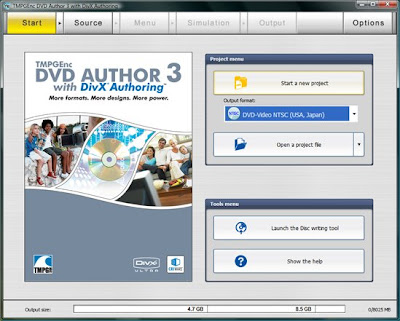
1. Open the application and click start a new project.
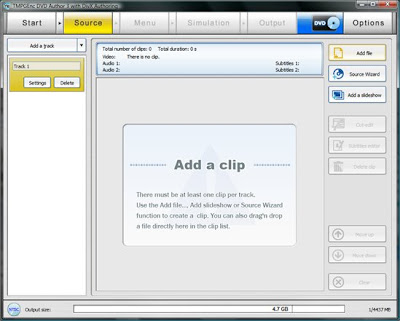
2. Select Add File and browse to your video file.
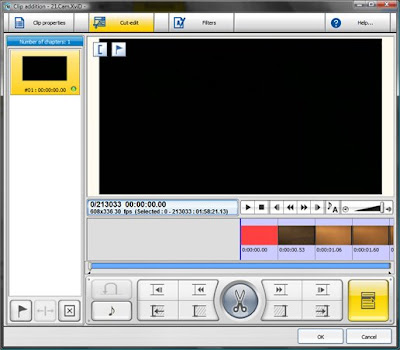
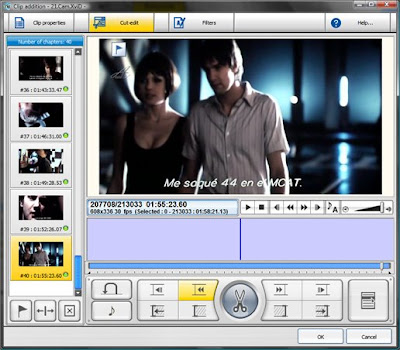
3. Select the Cut/Edit tab and hit Control + K hotkey.
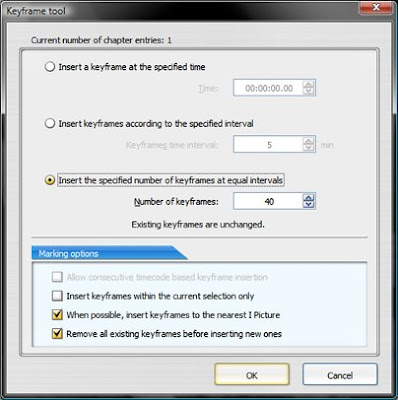
4. Select the options I have checked & the choose the amount of chapters you prefer.
5. Then click Ok twice.
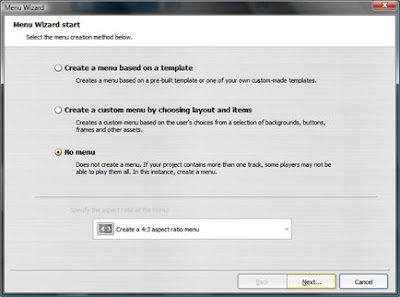
6. Click the Menu tab at the top.
-The menu wizard pops up.
-Select No Menu and then click Next.
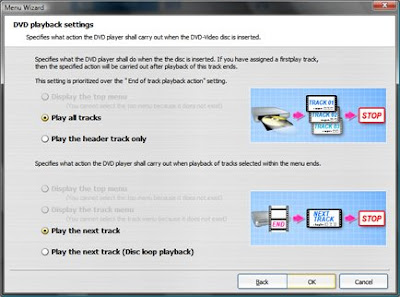
7. Leave the next window as is and click Ok .
8. Click the Simulation tab at the top and make sure your movie plays and sounds fine.
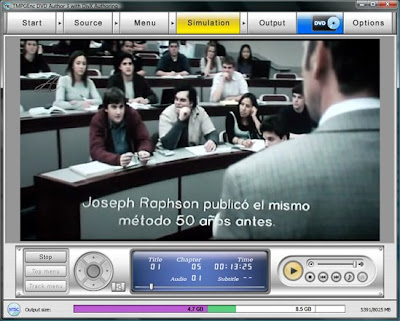
From this point forth, refer to the image below:
9. Select the Output tab at the top.
a) Browse to your desired Output folder.
b) Transcoding settings are for either single or dual-layer dvd’s. It’s your choice of media.
c) Post Output Process allows you to burn to disk immediately upon output completion, or you can create an iso file, or you can do nothing at all.
Note: You may want to check the dvd’s structure and
playback using Cyberlink's Powerdvd and then burn the VIDEO_TS folder with
another application like DVD Shrink, DVD FAb, or CloneDVD 2 to name a few.
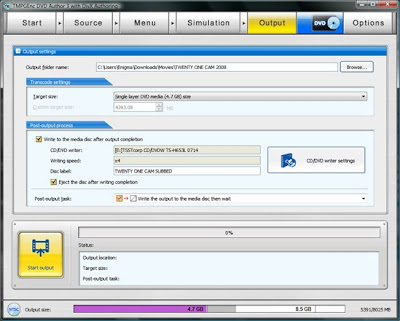
10 ) Click the Start button already!
Sit back and wait aproximately one half-hour to 45 mins. and then pop the dvd into your player!
Have fun!
One Step Encoding burned onto DVD.
1. Open the application and click start a new project.

2. Select Add File and browse to your video file.

3. Select the Cut/Edit tab and hit Control + K hotkey.

4. Select the options I have checked & the choose the amount of chapters you prefer.

5. Then click Ok twice.

6. Click the Menu tab at the top.
-The menu wizard pops up.
-Select No Menu and then click Next.

7. Leave the next window as is and click Ok .

8. Click the Simulation tab at the top and make sure your movie plays and sounds fine.

From this point forth, refer to the image below:
9. Select the Output tab at the top.
a) Browse to your desired Output folder.
b) Transcoding settings are for either single or dual-layer dvd’s. It’s your choice of media.
c) Post Output Process allows you to burn to disk immediately upon output completion, or you can create an iso file, or you can do nothing at all.
Note: You may want to check the dvd’s structure and
playback using Cyberlink's Powerdvd and then burn the VIDEO_TS folder with
another application like DVD Shrink, DVD FAb, or CloneDVD 2 to name a few.

10 ) Click the Start button already!
Sit back and wait aproximately one half-hour to 45 mins. and then pop the dvd into your player!
Have fun!
Subscribe to:
Posts (Atom)